

| Command Line Interface for Zstandard library | |
| ============================================ | |
| Command Line Interface (CLI) can be created using the `make` command without any additional parameters. | |
| There are however other Makefile targets that create different variations of CLI: | |
| - `zstd` : default CLI supporting gzip-like arguments; includes dictionary builder, benchmark, and support for decompression of legacy zstd formats | |
| - `zstd_nolegacy` : Same as `zstd` but without support for legacy zstd formats | |
| - `zstd-small` : CLI optimized for minimal size; no dictionary builder, no benchmark, and no support for legacy zstd formats | |
| - `zstd-compress` : version of CLI which can only compress into zstd format | |
| - `zstd-decompress` : version of CLI which can only decompress zstd format | |
| #### Compilation variables | |
| `zstd` scope can be altered by modifying the following `make` variables : | |
| - __HAVE_THREAD__ : multithreading is automatically enabled when `pthread` is detected. | |
| It's possible to disable multithread support, by setting `HAVE_THREAD=0`. | |
| Example : `make zstd HAVE_THREAD=0` | |
| It's also possible to force multithread support, using `HAVE_THREAD=1`. | |
| In which case, linking stage will fail if neither `pthread` nor `windows.h` library can be found. | |
| This is useful to ensure this feature is not silently disabled. | |
| - __ZSTD_LEGACY_SUPPORT__ : `zstd` can decompress files compressed by older versions of `zstd`. | |
| Starting v0.8.0, all versions of `zstd` produce frames compliant with the [specification](../doc/zstd_compression_format.md), and are therefore compatible. | |
| But older versions (< v0.8.0) produced different, incompatible, frames. | |
| By default, `zstd` supports decoding legacy formats >= v0.4.0 (`ZSTD_LEGACY_SUPPORT=4`). | |
| This can be altered by modifying this compilation variable. | |
| `ZSTD_LEGACY_SUPPORT=1` means "support all formats >= v0.1.0". | |
| `ZSTD_LEGACY_SUPPORT=2` means "support all formats >= v0.2.0", and so on. | |
| `ZSTD_LEGACY_SUPPORT=0` means _DO NOT_ support any legacy format. | |
| if `ZSTD_LEGACY_SUPPORT >= 8`, it's the same as `0`, since there is no legacy format after `7`. | |
| Note : `zstd` only supports decoding older formats, and cannot generate any legacy format. | |
| - __HAVE_ZLIB__ : `zstd` can compress and decompress files in `.gz` format. | |
| This is ordered through command `--format=gzip`. | |
| Alternatively, symlinks named `gzip` or `gunzip` will mimic intended behavior. | |
| `.gz` support is automatically enabled when `zlib` library is detected at build time. | |
| It's possible to disable `.gz` support, by setting `HAVE_ZLIB=0`. | |
| Example : `make zstd HAVE_ZLIB=0` | |
| It's also possible to force compilation with zlib support, using `HAVE_ZLIB=1`. | |
| In which case, linking stage will fail if `zlib` library cannot be found. | |
| This is useful to prevent silent feature disabling. | |
| - __HAVE_LZMA__ : `zstd` can compress and decompress files in `.xz` and `.lzma` formats. | |
| This is ordered through commands `--format=xz` and `--format=lzma` respectively. | |
| Alternatively, symlinks named `xz`, `unxz`, `lzma`, or `unlzma` will mimic intended behavior. | |
| `.xz` and `.lzma` support is automatically enabled when `lzma` library is detected at build time. | |
| It's possible to disable `.xz` and `.lzma` support, by setting `HAVE_LZMA=0`. | |
| Example : `make zstd HAVE_LZMA=0` | |
| It's also possible to force compilation with lzma support, using `HAVE_LZMA=1`. | |
| In which case, linking stage will fail if `lzma` library cannot be found. | |
| This is useful to prevent silent feature disabling. | |
| - __HAVE_LZ4__ : `zstd` can compress and decompress files in `.lz4` formats. | |
| This is ordered through commands `--format=lz4`. | |
| Alternatively, symlinks named `lz4`, or `unlz4` will mimic intended behavior. | |
| `.lz4` support is automatically enabled when `lz4` library is detected at build time. | |
| It's possible to disable `.lz4` support, by setting `HAVE_LZ4=0` . | |
| Example : `make zstd HAVE_LZ4=0` | |
| It's also possible to force compilation with lz4 support, using `HAVE_LZ4=1`. | |
| In which case, linking stage will fail if `lz4` library cannot be found. | |
| This is useful to prevent silent feature disabling. | |
| - __BACKTRACE__ : `zstd` can display a stack backtrace when execution | |
| generates a runtime exception. By default, this feature may be | |
| degraded/disabled on some platforms unless additional compiler directives are | |
| applied. When triaging a runtime issue, enabling this feature can provide | |
| more context to determine the location of the fault. | |
| Example : `make zstd BACKTRACE=1` | |
| #### Aggregation of parameters | |
| CLI supports aggregation of parameters i.e. `-b1`, `-e18`, and `-i1` can be joined into `-b1e18i1`. | |
| #### Symlink shortcuts | |
| It's possible to invoke `zstd` through a symlink. | |
| When the name of the symlink has a specific value, it triggers an associated behavior. | |
| - `zstdmt` : compress using all cores available on local system. | |
| - `zcat` : will decompress and output target file using any of the supported formats. `gzcat` and `zstdcat` are also equivalent. | |
| - `gzip` : if zlib support is enabled, will mimic `gzip` by compressing file using `.gz` format, removing source file by default (use `--keep` to preserve). If zlib is not supported, triggers an error. | |
| - `xz` : if lzma support is enabled, will mimic `xz` by compressing file using `.xz` format, removing source file by default (use `--keep` to preserve). If xz is not supported, triggers an error. | |
| - `lzma` : if lzma support is enabled, will mimic `lzma` by compressing file using `.lzma` format, removing source file by default (use `--keep` to preserve). If lzma is not supported, triggers an error. | |
| - `lz4` : if lz4 support is enabled, will mimic `lz4` by compressing file using `.lz4` format. If lz4 is not supported, triggers an error. | |
| - `unzstd` and `unlz4` will decompress any of the supported format. | |
| - `ungz`, `unxz` and `unlzma` will do the same, and will also remove source file by default (use `--keep` to preserve). | |
| #### Dictionary builder in Command Line Interface | |
| Zstd offers a training mode, which can be used to tune the algorithm for a selected | |
| type of data, by providing it with a few samples. The result of the training is stored | |
| in a file selected with the `-o` option (default name is `dictionary`), | |
| which can be loaded before compression and decompression. | |
| Using a dictionary, the compression ratio achievable on small data improves dramatically. | |
| These compression gains are achieved while simultaneously providing faster compression and decompression speeds. | |
| Dictionary work if there is some correlation in a family of small data (there is no universal dictionary). | |
| Hence, deploying one dictionary per type of data will provide the greater benefits. | |
| Dictionary gains are mostly effective in the first few KB. Then, the compression algorithm | |
| will rely more and more on previously decoded content to compress the rest of the file. | |
| Usage of the dictionary builder and created dictionaries with CLI: | |
| 1. Create the dictionary : `zstd --train PathToTrainingSet/* -o dictionaryName` | |
| 2. Compress with the dictionary: `zstd FILE -D dictionaryName` | |
| 3. Decompress with the dictionary: `zstd --decompress FILE.zst -D dictionaryName` | |
| #### Benchmark in Command Line Interface | |
| CLI includes in-memory compression benchmark module for zstd. | |
| The benchmark is conducted using given filenames. The files are read into memory and joined together. | |
| It makes benchmark more precise as it eliminates I/O overhead. | |
| Multiple filenames can be supplied, as multiple parameters, with wildcards, | |
| or names of directories can be used as parameters with `-r` option. | |
| The benchmark measures ratio, compressed size, compression and decompression speed. | |
| One can select compression levels starting from `-b` and ending with `-e`. | |
| The `-i` parameter selects minimal time used for each of tested levels. | |
| #### Usage of Command Line Interface | |
| The full list of options can be obtained with `-h` or `-H` parameter: | |
| ``` | |
| Usage : | |
| zstd [args] [FILE(s)] [-o file] | |
| FILE : a filename | |
| with no FILE, or when FILE is - , read standard input | |
| Arguments : | |
| -# : # compression level (1-19, default: 3) | |
| -d : decompression | |
| -D file: use `file` as Dictionary | |
| -o file: result stored into `file` (only if 1 input file) | |
| -f : overwrite output without prompting and (de)compress links | |
| --rm : remove source file(s) after successful de/compression | |
| -k : preserve source file(s) (default) | |
| -h/-H : display help/long help and exit | |
| Advanced arguments : | |
| -V : display Version number and exit | |
| -v : verbose mode; specify multiple times to increase verbosity | |
| -q : suppress warnings; specify twice to suppress errors too | |
| -c : force write to standard output, even if it is the console | |
| -l : print information about zstd compressed files | |
| --ultra : enable levels beyond 19, up to 22 (requires more memory) | |
| --long : enable long distance matching (requires more memory) | |
| --no-dictID : don't write dictID into header (dictionary compression) | |
| --[no-]check : integrity check (default: enabled) | |
| -r : operate recursively on directories | |
| --format=gzip : compress files to the .gz format | |
| --format=xz : compress files to the .xz format | |
| --format=lzma : compress files to the .lzma format | |
| --test : test compressed file integrity | |
| --[no-]sparse : sparse mode (default: disabled) | |
| -M# : Set a memory usage limit for decompression | |
| -- : All arguments after "--" are treated as files | |
| Dictionary builder : | |
| --train ## : create a dictionary from a training set of files | |
| --train-cover[=k=#,d=#,steps=#,split=#,shrink[=#]] : use the cover algorithm with optional args | |
| --train-fastcover[=k=#,d=#,f=#,steps=#,split=#,shrink[=#],accel=#] : use the fastcover algorithm with optional args | |
| --train-legacy[=s=#] : use the legacy algorithm with selectivity (default: 9) | |
| -o file : `file` is dictionary name (default: dictionary) | |
| --maxdict=# : limit dictionary to specified size (default: 112640) | |
| --dictID=# : force dictionary ID to specified value (default: random) | |
| Benchmark arguments : | |
| -b# : benchmark file(s), using # compression level (default: 3) | |
| -e# : test all compression levels from -bX to # (default: 1) | |
| -i# : minimum evaluation time in seconds (default: 3s) | |
| -B# : cut file into independent blocks of size # (default: no block) | |
| --priority=rt : set process priority to real-time | |
| ``` | |
| #### Restricted usage of Environment Variables | |
| Using environment variables to set compression/decompression parameters has security implications. Therefore, | |
| we intentionally restrict its usage. Currently, only `ZSTD_CLEVEL` is supported for setting compression level. | |
| If the value of `ZSTD_CLEVEL` is not a valid integer, it will be ignored with a warning message. | |
| Note that command line options will override corresponding environment variable settings. | |
| #### Long distance matching mode | |
| The long distance matching mode, enabled with `--long`, is designed to improve | |
| the compression ratio for files with long matches at a large distance (up to the | |
| maximum window size, `128 MiB`) while still maintaining compression speed. | |
| Enabling this mode sets the window size to `128 MiB` and thus increases the memory | |
| usage for both the compressor and decompressor. Performance in terms of speed is | |
| dependent on long matches being found. Compression speed may degrade if few long | |
| matches are found. Decompression speed usually improves when there are many long | |
| distance matches. | |
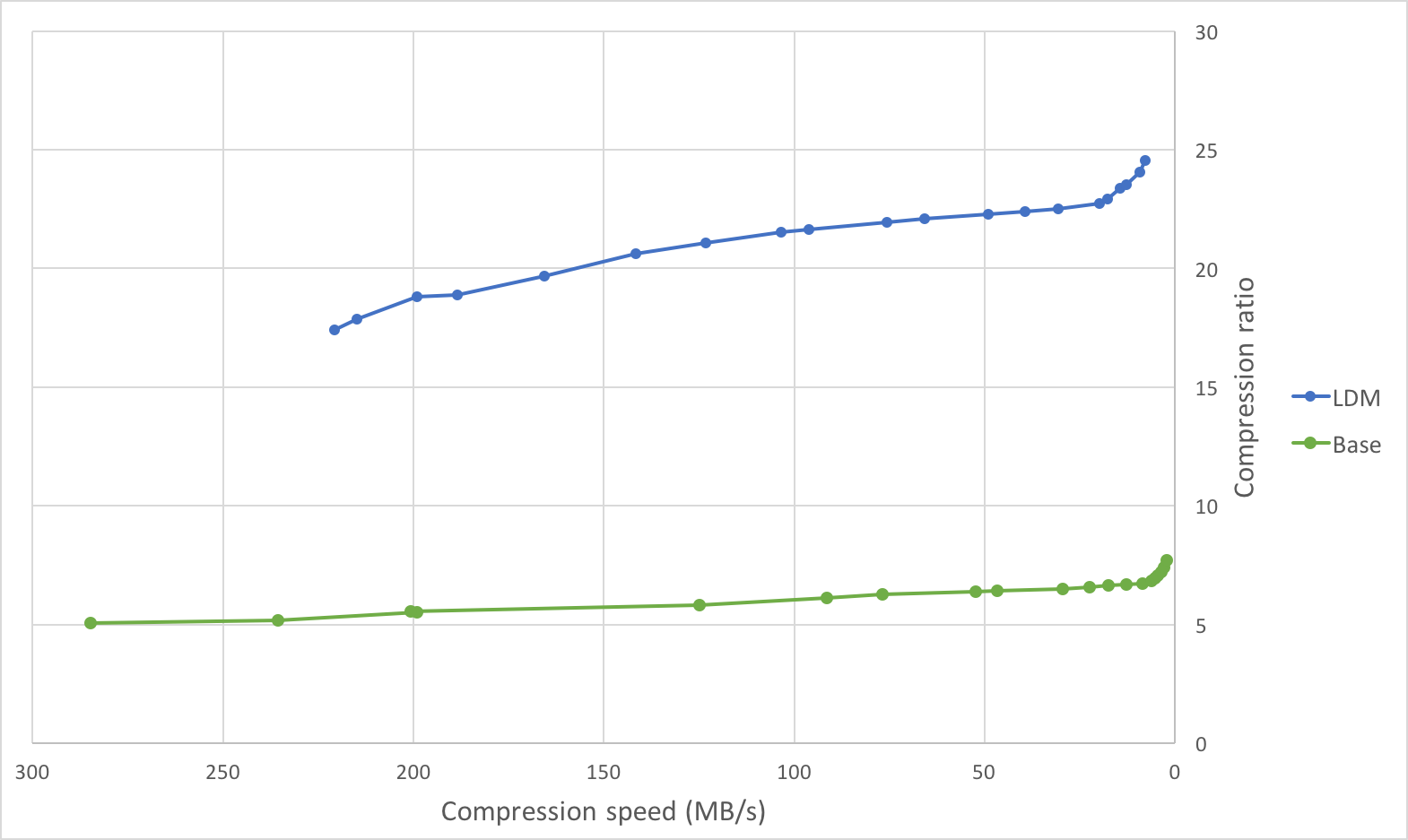
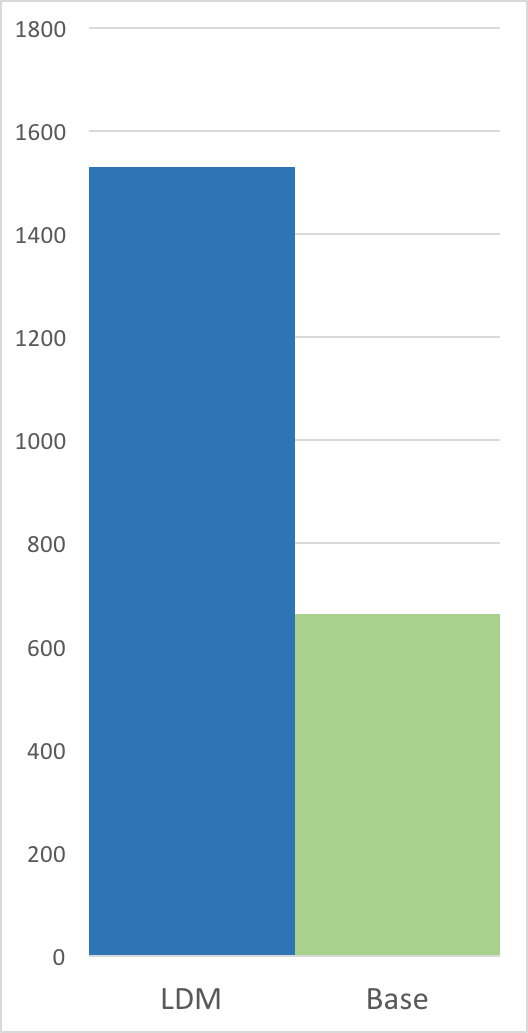
| Below are graphs comparing the compression speed, compression ratio, and | |
| decompression speed with and without long distance matching on an ideal use | |
| case: a tar of four versions of clang (versions `3.4.1`, `3.4.2`, `3.5.0`, | |
| `3.5.1`) with a total size of `244889600 B`. This is an ideal use case as there | |
| are many long distance matches within the maximum window size of `128 MiB` (each | |
| version is less than `128 MiB`). | |
| Compression Speed vs Ratio | Decompression Speed | |
| ---------------------------|--------------------- | |
|  |  | |
| | Method | Compression ratio | Compression speed | Decompression speed | | |
| |:-------|------------------:|-------------------------:|---------------------------:| | |
| | `zstd -1` | `5.065` | `284.8 MB/s` | `759.3 MB/s` | | |
| | `zstd -5` | `5.826` | `124.9 MB/s` | `674.0 MB/s` | | |
| | `zstd -10` | `6.504` | `29.5 MB/s` | `771.3 MB/s` | | |
| | `zstd -1 --long` | `17.426` | `220.6 MB/s` | `1638.4 MB/s` | | |
| | `zstd -5 --long` | `19.661` | `165.5 MB/s` | `1530.6 MB/s`| | |
| | `zstd -10 --long`| `21.949` | `75.6 MB/s` | `1632.6 MB/s`| | |
| On this file, the compression ratio improves significantly with minimal impact | |
| on compression speed, and the decompression speed doubles. | |
| On the other extreme, compressing a file with few long distance matches (such as | |
| the [Silesia compression corpus]) will likely lead to a deterioration in | |
| compression speed (for lower levels) with minimal change in compression ratio. | |
| The below table illustrates this on the [Silesia compression corpus]. | |
| [Silesia compression corpus]: http://sun.aei.polsl.pl/~sdeor/index.php?page=silesia | |
| | Method | Compression ratio | Compression speed | Decompression speed | | |
| |:-------|------------------:|------------------:|---------------------:| | |
| | `zstd -1` | `2.878` | `231.7 MB/s` | `594.4 MB/s` | | |
| | `zstd -1 --long` | `2.929` | `106.5 MB/s` | `517.9 MB/s` | | |
| | `zstd -5` | `3.274` | `77.1 MB/s` | `464.2 MB/s` | | |
| | `zstd -5 --long` | `3.319` | `51.7 MB/s` | `371.9 MB/s` | | |
| | `zstd -10` | `3.523` | `16.4 MB/s` | `489.2 MB/s` | | |
| | `zstd -10 --long`| `3.566` | `16.2 MB/s` | `415.7 MB/s` | | |
| #### zstdgrep | |
| `zstdgrep` is a utility which makes it possible to `grep` directly a `.zst` compressed file. | |
| It's used the same way as normal `grep`, for example : | |
| `zstdgrep pattern file.zst` | |
| `zstdgrep` is _not_ compatible with dictionary compression. | |
| To search into a file compressed with a dictionary, | |
| it's necessary to decompress it using `zstd` or `zstdcat`, | |
| and then pipe the result to `grep`. For example : | |
| `zstdcat -D dictionary -qc -- file.zst | grep pattern` |